
做iot的基本条件:
- 可以联网的硬件
- 网络
- 通信协议
- 代理服务器
- 监控终端
- 可以联网的硬件:
- 首先是硬件功能要完备:联网,数字io,模拟io,各类端口(i2c,uart,spi)…
- 其次是编程要简单可靠
- 再者是价格要便宜
- esp32:(详见:https://docs.espressif.com/projects/esp-idf/zh_CN/latest/get-started/index.html)
- 2.4 GHz Wi-Fi
- 蓝牙 4.2 标准
- 高性能双核
- 超低功耗协处理器
- 多种外设
- 多种软件开发环境
- 价格便宜(某宝:20元)
- 网络
- 基于WiFi可以连接inetrnet:现在一般家庭都有WiFi路由器。
- 通信协议
- mqtt协议。基于信息的发布和订阅:发布者可以是iot设备也可以是监控终端,发布者发出一个主题,则所有订阅该主题的设备都将收到该主题的信息。例如iot设备可以将温度数字用“温度”主题发布,订阅该主题的监控终端就可以收到该主题即得到温度值,同样监控终端也可以发布“开关”主题,使得订阅该主题的iot设备得到某一开关量的值来控制该开关。
- 代理服务器
- 服务器软件mosquitto,mqtt代理软件。网络环境可以基于家庭的WiFi路由建立简单的Linux server,也可以在Internet上租用虚拟主机
- 监控终端
- 手机上mqtt APP 就可以实现mqtt的发布和订阅
- pc机应用mosquitto client实现mqtt的发布和订阅
首先搭建mqtt服务器:
因为我已经在腾讯云端拥有一50G的ubuntu主机。所以我就选择在该主机上搭建mqtt代理服务。很简单通过下面命令即可安装mosquitto软件。
$ sudo apt-add-repository ppa:mosquitto-dev/mosquitto-ppa
$ sudo apt-get update
$ sudo apt-get install mosquitto
安装完后可以用下面命令检查mosquitto是否运行:
$ systemctl status mosquitto.service
● mosquitto.service – LSB: mosquitto MQTT v3.1 message broker
Loaded: loaded (/etc/init.d/mosquitto; bad; vendor preset: enabled)
Active: active (running) since Tue 2019-06-11 17:50:05 CST; 1 day 16h ago
Docs: man:systemd-sysv-generator(8)
CGroup: /system.slice/mosquitto.service
└─7693 /usr/sbin/mosquitto -c /etc/mosquitto/mosquitto.conf
Warning: Journal has been rotated since unit was started. Log output is incomple
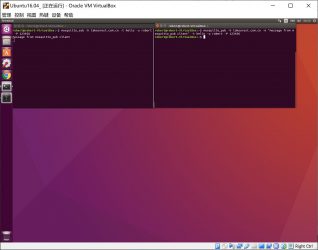
在pc上运行mosquitto client软件就可以发布和订阅了。如下图,左面的窗订阅了“hello”主题的信息。右面的窗发布了“hello”主题的信息。(服务器域名是takearest.com.cn)
其次就是esp32的程序编写
选esp32其中一个重要原因是它支持micropython的编写。关于micropython可以参见官网:http://www.micropython.org/,以及esp32 micropython介绍:http://docs.micropython.org/en/latest/esp32/quickref.html,这里就不详述了。
具体编程环境也有很多,我采用的是pycharm+micropython plug。主要有两个python文件,一个是boot.py,esp32启动时调用,在boot.py中定义了一些参数和WiFi登录信息,以及订阅了”notification”主题,发布主题”test”。另一个是main.py,esp32启动后运行的程序,在main.py中定义了eps32 的 gpio2用于数字输出控制led灯;gpio15用于数字输出用于ds18x20温度传感器的3.3v供电;gpio21用于读取ds18x20的数字输入。连上esp32,用pycharm编程环境上传这两个文件,即可运行。
通过程序eps32每间隔5秒读取一次温度参数并转换led的开关,并将该温度参数和led灯的状态发布。有兴趣的读者可以用手APP,订阅“test”就可以收到led状态和温度了(如没有收到说明已经关电了,下次上电才能收到)。
实验的esp32: 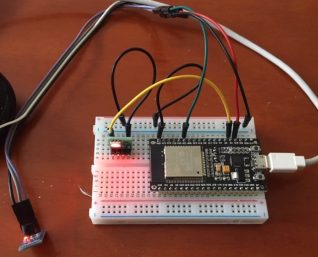
pc端订阅的信息: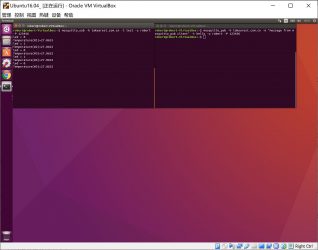
手机端订阅的信息: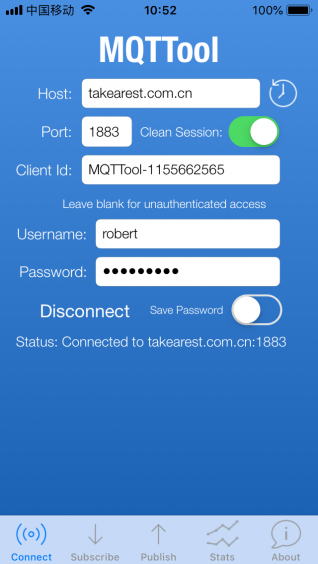
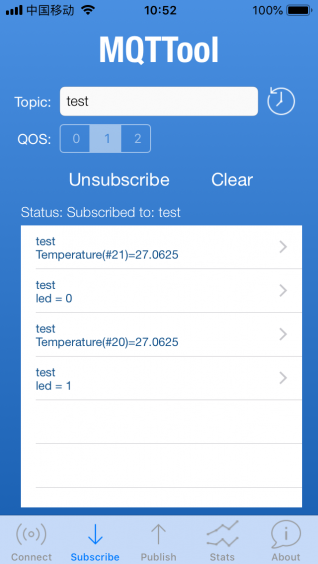
将程序稍加修改就可以通过手机发布”notificatgion”信息对led开关进行控制了。看看iot是不是很容易!
micropython文件清单:
boot.py:
import time
from umqtt.simple import MQTTClient
import ubinascii
import machine
import micropython
import network
import esp
esp.osdebug(None)
import gc
gc.collect()
ssid = 'wifi id'
password = 'wifi password'
#更改成你自己的mqtt 服务器相应的信息
mqtt_server = 'takearest.com.cn'
mqtt_user='robert'
mqtt_pwd='123456'
client_id = ubinascii.hexlify(machine.unique_id())
topic_sub = b'notification'
topic_pub = b'test'
last_message = 0
message_interval = 5
counter = 0
station = network.WLAN(network.STA_IF)

station.active(True)
station.connect(ssid, password)

while station.isconnected() == False:
  pass

print('Connection successful')
print(station.ifconfig())
main.py:
from machine import Pin
import onewire
import time, ds18x20

def sub_cb(topic, msg):
    print((topic, msg))
    if topic == b'notification' and msg == b'received':
        print('ESP received hello message')

def connect_and_subscribe():
    global client_id, mqtt_server, topic_sub, mqtt_user, mqtt_pwd
    client = MQTTClient(client_id, mqtt_server, user=mqtt_user, password=mqtt_pwd, keepalive=60)
    client.set_callback(sub_cb)
    client.connect()
    client.subscribe(topic_sub)
    print('Connected to %s MQTT broker, subscribed to %s topic' % (mqtt_server, topic_sub))
    return client

def restart_and_reconnect():
    print('Failed to connect to MQTT broker. Reconnecting...')
    time.sleep(10)
    machine.reset()

if __name__ == '__main__':

    try:
        client = connect_and_subscribe()
    except OSError as e:
        restart_and_reconnect()
    v33 = Pin(15, Pin.OUT)
    v33.on()
    ow = onewire.OneWire(Pin(21))  # create a OneWire bus on GPIO12
    ds = ds18x20.DS18X20(ow)
    roms = ds.scan()
    ds.convert_temp()
    time.sleep_ms(750)
    for rom in roms:
        print(ds.read_temp(rom))
    led = Pin(2, Pin.OUT)
    enabled = False
    while True:
        try:
            client.check_msg()
            if (time.time() - last_message) > message_interval:
                if enabled:
                    led.off()
                    print("led off\r\n")
                    msg = "led = 0"
                else:
                    led.on()
                    print("led on\r\n")
                    msg = "led = 1"
                client.publish(topic_pub, msg)
                enabled = not enabled
                ds.convert_temp()
                time.sleep_ms(750)
                for rom in roms:
                    #print("rom=", rom, " temp=", ds.read_temp(rom))
                    msg = b'Temperature(#%d)=' % counter
                    print("org ", msg)
                    msg = msg + str(ds.read_temp(rom))
                    print("+temperature msg=", msg)
                    client.publish(topic_pub, msg)
                last_message = time.time()
                counter += 1
        except OSError as e:
            restart_and_reconnect()
No Comments